I pulled 14 days of Apache and ModSecurity logs from a single small web host. Nothing special about it. A handful of low-traffic virtual hosts. A WordPress site, a couple of custom application backends, a static devotional site. The kind of server that exists by the millions and that nobody would call a high-value target. Server IP and hostnames are anonymized throughout this diary.
The point of looking was not to find a breach. It was to see what the background radiation of internet scanning looks like in 2026. Most of it is exactly what you would expect. WordPress xmlrpc floods. Endless .env probing. Git config fishing. But mixed into the noise was a category of scanning I had not seen documented before. Someone is systematically looking for Model Context Protocol servers, AI assistant configuration files, and locally exposed LLM endpoints. On a server that runs none of those things.
Figure 1 breaks down the reconnaissance categories that ModSecurity flagged over the two-week window. I split them into two groups. The classic cloud and application recon that every server sees, and the newer AI-agent recon that is the subject of this diary.
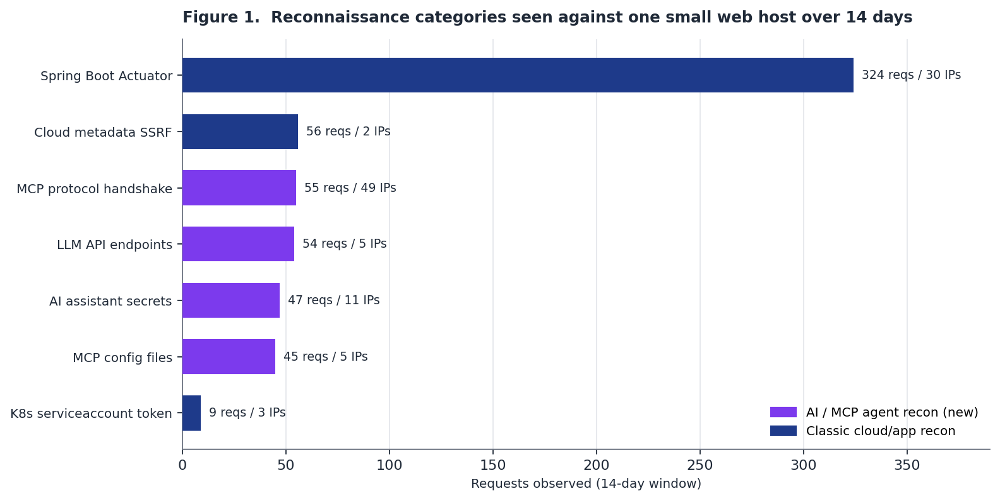 ???????
Spring Boot Actuator scanning dominates by request volume. That is not new. The full set of actuator endpoints including /actuator/heapdump and /actuator/env gets hit hundreds of times from dozens of sources. The interesting part is the group below it. MCP handshakes, LLM API probes, AI assistant secret fishing, and MCP config files together account for roughly 200 requests. And the MCP protocol handshake category came from 49 distinct source IPs, more spread than any other category in the dataset. This is not one researcher. It is a broad, distributed scan.
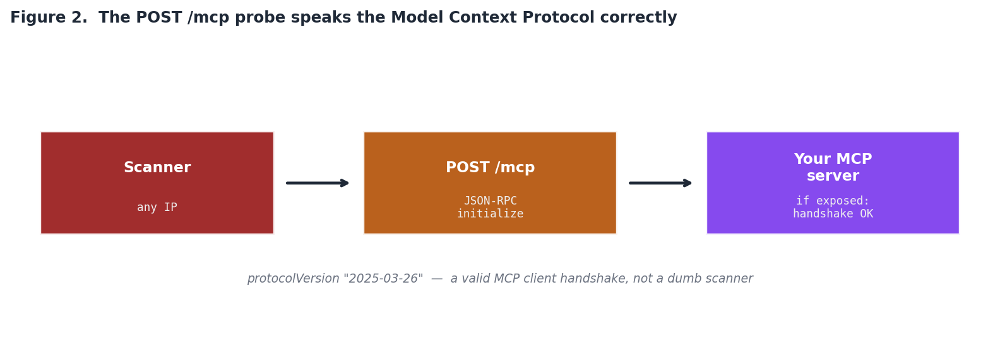
Most scanning is dumb. A bot requests a path, checks the status code, moves on. The POST /mcp probes were different. Every one of them carried a valid JSON-RPC 2.0 body performing a Model Context Protocol initialize call.
POST /mcp HTTP/1.1
Content-Type: application/json
{“id”:1,”jsonrpc”:”2.0″,”method”:”initialize”,
“params”:{“capabilities”:{},
“clientInfo”:{“name”:”client”,”version”:”0″},
“protocolVersion”:”2025-03-26″}}
This matters. The scanner is not blindly requesting a URL. It is speaking the protocol. It sends a correctly formed handshake with a real MCP protocol version and waits to see if something on the other end answers like an MCP server. If your server responds to that initialize call then the next steps are to enumerate the tools the server exposes, the data sources it connects to, and whatever it can be convinced to do. Figure 2 shows the flow.
For readers who have not deployed one yet: an MCP server is the bridge that lets an AI agent call tools and read data sources. It is the thing that gives a model access to your database, your file system, your ticketing system, your internal APIs. An exposed and unauthenticated MCP server is close to the worst case. It is a remote, machine-readable menu of everything an agent can touch, offered to anyone who completes the handshake. The scanners clearly know this and are looking for them at internet scale.
Alongside the live-server handshakes, the scanners fished aggressively for configuration and credential files belonging to AI coding assistants. These are the files that tools like Claude and Cursor write to a project or home directory. When developers accidentally deploy them to a web root, they leak.
The paths requested were specific and current. Not guesses. Someone built this wordlist recently and from real knowledge of how these tools store their settings.
GET /.claude/mcp.json
GET /.cursor/mcp.json
GET /.cursor/mcp_config.json
GET /.vscode/mcp.json
GET /.mcp/config.json
GET /.claude/settings.local.json
HEAD /.claude/.credentials.json
HEAD /.config/claude/.credentials.json
The use of HEAD for the credential files is a tell. HEAD returns headers without a body. The scanner is checking whether the file exists before spending bandwidth to download it. That is an efficiency optimization you build when you are scanning a very large number of hosts and expect most to be misses. It signals a mature, wide campaign rather than a one-off curiosity probe.
The same run also fished for cloud credential files across every major provider. Figure 3 shows the spread. Generic credentials.json, then GCP, AWS, and Azure specific variants, then Kubernetes and application-specific names. The AI assistant credentials sit inside this same wordlist, which tells you the tooling authors now treat AI assistant secrets as just another cloud credential worth harvesting.
The third strand was probing for exposed LLM inference endpoints. Two signatures dominated.
- GET /v1/models is the OpenAI-compatible model-listing endpoint. Dozens of self-hosted inference servers expose it. If it answers without authentication then the host is running a model that anyone can query, which means free compute for the attacker and a potential pivot point.
- GET /api/tags is the Ollama endpoint that lists locally installed models. Ollama binds to localhost by default but is very commonly exposed to the network by accident. A response here is a strong signal of an unauthenticated local LLM.
Neither endpoint exists on the host I was looking at. Both were requested repeatedly from multiple sources. The scanners are casting a wide net for anyone who stood up a local model and forgot to put it behind authentication.
Bundled with the AI-agent recon was a familiar technique that pairs naturally with it. SSRF attempts targeting the cloud metadata service to steal instance credentials.
GET /fetch?url=
GET /fetch?uri=
GET /fetch?path=
GET /fetch?dest=
The scanner rotates the parameter name across url, uri, path, and dest. It is looking for any proxy or fetch endpoint that will follow a supplied URL. The target is the GCP metadata endpoint that returns a service-account token. This is worth flagging in the AI context because agent and LLM tooling frequently includes fetch-style helpers that take a URL and retrieve it. That is exactly the kind of endpoint this probe is built to find. An MCP server or an agent tool that fetches arbitrary URLs is a ready-made SSRF primitive.
Concrete things to look for in your own logs and infrastructure.
- Grep for the MCP handshake. Search access logs for POST /mcp and /sse. If you do not run an MCP server, any such request is pure recon and a useful indicator to block. If you do run one, confirm it requires authentication and is not reachable from the internet.
- Hunt for AI-config paths in your web roots. Make sure no .claude/, .cursor/, .vscode/mcp.json, or .credentials.json file is served by your web server. These belong in developer home directories, never in a deployed web root.
- Check for accidentally exposed LLM endpoints. From outside your network, request /v1/models and /api/tags against your hosts. If either answers, you have an unauthenticated model exposed.
- Review fetch-style endpoints for SSRF. Any endpoint that takes a URL parameter and retrieves it should block requests to 169.254.169.254 and metadata.google.internal. This applies doubly to agent tooling.
- Enable metadata service protection. On GCP use metadata server v1 with header enforcement. On AWS require IMDSv2. This defangs the metadata SSRF even if a vulnerable fetch endpoint exists.
The full set of AI-agent recon signatures observed, with the intent behind each.
|
Request path probed
|
What the attacker is after
|
|
POST /mcp (JSON-RPC initialize)
|
A live Model Context Protocol server to enumerate tools and data sources
|
|
GET /sse
|
Server-Sent Events transport used by older MCP servers
|
|
/.claude/mcp.json /.cursor/mcp.json
|
MCP client config with server endpoints and sometimes API keys
|
|
/.vscode/mcp.json /.mcp/config.json
|
Editor and project-level MCP configuration
|
|
HEAD /.claude/.credentials.json
|
Stored credentials for an AI coding assistant. HEAD checks existence first
|
|
GET /v1/models /api/tags
|
An unauthenticated LLM endpoint (OpenAI-compatible or Ollama)
|
|
/fetch?url=…metadata.google.internal
|
SSRF to steal a GCP service-account token via a proxy endpoint
|
|
/var/run/secrets/…/serviceaccount/token
|
A Kubernetes service-account token via path traversal or misrouting
|
None of the AI-agent infrastructure the scanners were looking for existed on this host. That is the point. This is broad, opportunistic, internet-wide scanning that has already added MCP servers, AI assistant credentials, and local LLM endpoints to its standard target list. The tooling authors did not wait for these deployments to become common. They are scanning ahead of the curve, ready for the moment a developer exposes one.
The lesson for defenders is simple. Your attack surface grew when your organization adopted AI agents, and the scanners already know it. An exposed MCP server is a machine-readable inventory of everything an agent can do, offered to anyone who speaks the protocol. An AI assistant credential file in a web root is a working key. A local LLM without authentication is free compute and a pivot point. Treat all three as the sensitive, internet-facing assets they now are. The scanning confirms someone else already does.
Manuel Humberto Santander Peláez
SANS Internet Storm Center – Handler
X: @manuelsantander
Mastodon:[email protected]
Linkedin: https://linkedin.com/in/manuelsantander
email: [email protected]