If you are shortlisting phishing simulation tools, the hard part is telling which ones actually change employee behavior and which just generate compliance reports. This guide compares the nine platforms enterprises evaluate most in 2026 on the dimensions that move real risk, then shows where each one fits.
The short answer
The best phishing simulation tools run continuous, adaptive simulations that mirror current attacks, personalize difficulty to each employee’s risk, and feed reporting straight into incident response. Compare them on realism, AI personalization, engagement, microlearning and SOC-ready reporting. The strongest 2026 options are Hoxhunt, Proofpoint, KnowBe4, Cofense, Phished, Ninjio, Mimecast, Infosec IQ and Microsoft Defender.
What is a phishing simulation tool?
A phishing simulation tool sends safe, realistic fake phishing emails (and increasingly QR-code, voice and deepfake lures) to employees, measures who clicks, reports or ignores them, and delivers training at the moment of failure. The best platforms move beyond one-off tests into continuous, adaptive programs that personalize difficulty per user and feed the resulting signals into the security team’s incident response.
What should buyers look for in phishing simulation tools in 2026?
Buyers should prioritize phishing tools that mirror real-world threats, adapt to user behavior, integrate into existing email and security systems, and help teams create relevant training without heavy manual production. Key features to look for include deepfake simulation, AI-generated phishing and training content, localization, policy-based lesson creation, actionable reporting, and automation that scales without manual overhead.
If your goal is measurable behavior change, choose a behavior-first platform like Hoxhunt. If you mainly need compliance requirements, suites like Proofpoint or KnowBe4 fit better (but might not actually protect you against real breaches).
Key evaluation criteria for buyers
In 2026, phishing simulation tools must go far beyond check-the-box compliance. Here’s what enterprises are prioritizing:
Real-world simulation capabilities
The best tools simulate modern phishing vectors:
Platforms like Hoxhunt lead here, with adaptive difficulty and continuous updates based on emerging attack trends.
AI-generated phishing is now the norm rather than a novelty (Hoxhunt Phishing Trends Report 2026) — so a tool’s realism and update cadence matter more than raw template count.
Content depth & training quality
Security teams are demanding:
- Micro-training that adapts by role, behavior, and individual progress – not static modules
- Custom training creation from internal policies, guidelines, web links, and existing training context
- Language localization for global workforces, including AI-assisted translations across 42 languages
- Editable lessons and branded training experiences that match internal communications
- Gamified learning to boost participation across departments
Older vendors like KnowBe4 face criticism for “cartoonish” or “dated” content, while newer players like Ninjio offer episodic and story-driven formats whilst hoxhunt leads in gamification.
Integration with security stack
CISOs ask:
- Does the tool sync with Office 365, and email filters?
- Can it trigger follow-ups in SIEMs, SOARs, or LMSs?
- Does it support API integrations for custom dashboards?
Hoxhunt, KnowBe4, and Proofpoint score well here – but manual whitelisting (e.g. with QR codes in Outlook) can still break tests if mishandled.
Reporting that CISOs can use
Key questions:
- Can we see risk by department, click vs. report rate, and time-to-report?
- Is the data exportable?
- Are there board-level visuals for execs?
Hoxhunt and KnowBe4 both offer risk dashboards but usability varies. Some teams complain KnowBe4’s reporting is “confusing,” while others praise its API access for custom metrics.
User-centric experience
Security teams are ditching “gotcha” training. Today’s best platforms:
- Offer immediate feedback on clicks and reports
- Use one consistent phishing button across email clients
- Reward good behavior with points or nudges, not just penalties
This user-centered philosophy – pioneered by Hoxhunt – aligns with modern HR and change management principles.
How we evaluated these tools
We compared the nine platforms on the same criteria, using sources a buyer can verify rather than a hands-on lab test of every product.
- Third-party review platforms. Live G2 ratings and review counts (pulled July 2026), alongside Capterra, TrustRadius and Gartner Peer Insights, so each tool is grounded in real user volume rather than a single quote.
- Documented capabilities. Each platform’s published features for realism, AI personalization, gamification, microlearning and reporting.
- Published outcomes. Named customer case studies with measurable results, plus the Hoxhunt Phishing Trends Report 2026 for behavior-change benchmarks.
- Consistent dimensions. Every tool is assessed on the same six dimensions: realism, AI and adaptivity, gamification, microlearning, reporting and integrations, and best fit, so the comparison is like for like.
The ratings shown reflect each product’s full review total on G2 as of July 2026, so the picture is the aggregate rather than selected quotes.
Phishing simulation software comparison (2026)
How the nine platforms compare on the dimensions that decide behavior change. Gamification and microlearning are where adaptive, behavior-first tools separate from static template libraries.
| Tool | Realism & attack coverage | AI / adaptive | Gamification & engagement | Microlearning / on-fail | Best for |
|---|---|---|---|---|---|
| Hoxhunt |
|
|
|
|
|
| Proofpoint |
|
|
|
|
|
| KnowBe4 |
|
|
|
|
|
| Cofense PhishMe |
|
|
|
|
|
| Phished |
|
|
|
|
|
| Ninjio |
|
|
|
|
|
| Mimecast |
|
|
|
|
|
| Infosec IQ |
|
|
|
|
|
| Microsoft Defender |
|
|
|
|
|
1. Hoxhunt
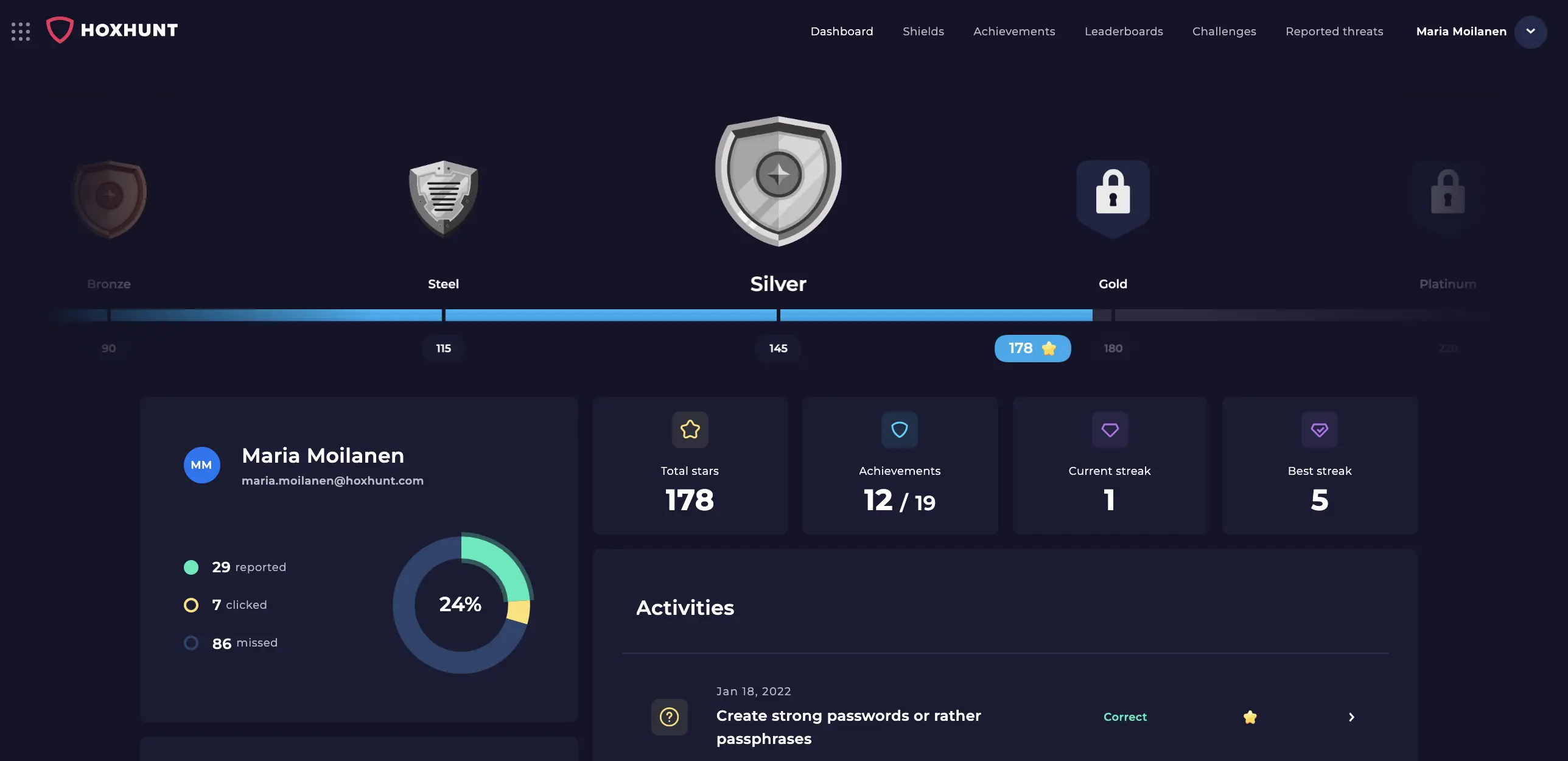
Hoxhunt uses AI and behavioral science to deliver personalized, gamified micro-training that measurably reduces phishing risk. The platform combines adaptive simulations, instant feedback, human risk analytics, and custom awareness content that can be generated from internal policies, web links, and existing training context. With top-tier ratings across platforms and real user praise for engagement and realism, Hoxhunt is built to drive measurable behavior change while reducing the manual effort required to keep training relevant.
Across Hoxhunt’s 2026 dataset, real-threat detection climbed from 13% to 71% over the training curve (Hoxhunt Phishing Trends Report 2026, pp. 37–39) — behavior change a static template library can’t show.
What users like
Exceptional ease of use & engagement
- Intuitive, easy-to-use interface that employees adopt quickly
- Reporting and training dashboards motivate users to track progress
- Implementation is straightforward, minimizing admin overhead
Effective gamification drives behavior
- Points, badges, and leaderboards keep participation consistently high
- “Spicy mode” and dynamic difficulty add challenge for advanced users
- Gamification builds a positive, social culture around phishing resilience
Realistic simulations
- Phishing tests closely mirror real-world threats, from QR codes to deepfakes
- Regularly updated scenarios ensure simulations remain current and convincing
- Employees gain hands-on experience recognizing and reporting attacks safely
Custom and localized training content
- AI-assisted lesson creation helps teams turn policies, guidance, and internal context into employee-ready training
- Editable lessons and branded themes make training feel aligned with company communications
- AI translations and 42-language support help global organizations scale training across regions
- Policy acknowledgement options help connect awareness training with compliance and internal governance workflows
User satisfaction & reviews
- G2: 4.8/5
- Capterra: 4.9/5
- Software Advice: 4.9/5
- TrustRadius: 9.3/10 overall score, with strong comments on engagement and gamified learning
Things to consider with Hoxhunt
Gamification skepticism
- Some leaders question whether badges and streaks are meaningful or just a gimmick.
- Yet, independent studies and reviews consistently show gamification boosts engagement, particularly for non-technical employees who might otherwise tune out. We broke down out thinking on gamified cyber security training here.
Frequency of simulations
- Some end-users may resist regular training. But data shows repetition builds habits: Hoxhunt customers report 60% success rates after the first year, with the fastest 10% of users reporting a phishing email in under 60 seconds.
More focused than encyclopedic
- Unlike platforms with massive off-the-shelf template libraries, Hoxhunt is focused on realism, behavior change, and quality. Admins can also use AI-assisted content creation to generate tailored training from policies, web links, and internal context, helping teams close content gaps without relying only on generic modules.
Hoxhunt pros & cons
| Feature | Highlights | Things to Consider |
|---|---|---|
| Ease of Use |
|
|
| Engagement |
|
|
| Realism |
|
|
| Custom Content & Localization |
|
|
| Reporting & Analytics |
|
|
| Support & Satisfaction |
|
|
| Training Frequency |
|
|
2. Proofpoint Security Awareness Training
Proofpoint provides a broad library of phishing templates and compliance-oriented training modules aimed at compliance-driven programs. The product emphasizes audit-ready reporting and role-based campaign customization, though enterprises should expect more admin configuration for complex deployments.
.webp)
What users like
Content library & compliance depth
- Large library of phishing templates covering real-world attacks
- Strong focus on compliance and audit requirements
- Useful for regulated industries needing broad training coverage
Customizable and flexible training delivery
- Campaigns can be tailored by role, language, and skill level
- Flexible training modules that align with internal security policies
- Supports multi-language and role-based customization
Breadth over engagement
- Excels at comprehensive coverage for enterprise needs
- Best suited for compliance-driven training programs
- Less focused on gamified or adaptive engagement compared to newer platforms
User satisfaction & reviews
- G2: 4.5/5
- Capterra: 4.6/5
- Software Advice: 4.6/5
- TrustRadius: 8.4/10
Things to consider with Proofpoint
Complex setup & learning curve
- Depth and flexibility come at the cost of admin complexity – smaller teams may find it more work than more user-friendly, streamlined platforms.
Content overload
- A vast library is a strength, but some reviewers note it can be overwhelming without guided recommendations.
- “Too many templates to select and make decisions.”
Fragmented interface
- Some users report navigation feels spread across different modules.
Engagement vs compliance
- Proofpoint excels in compliance coverage, but engagement levels aren’t always as high as gamified, adaptive platforms like Hoxhunt.
Proofpoint pros & cons
3. KnowBe4
KnowBe4 offers a large template libraries and a mature platform for scaling security awareness and phishing simulation programs. It’s straightforward to deploy but some customers report content repetition and an admin learning curve for advanced features.
.webp)
What users like
Extensive content library
- One of the largest libraries of phishing templates and training modules
- Frequent updates tied to real-world attack themes and current events
- Strong compliance coverage for regulated industries
Ease of setup and scale
- Quick to launch phishing campaigns and awareness programs
- Integrates with Microsoft 365 and Active Directory for large deployments
- Works well for teams needing broad, repeatable template coverage
Awareness and reporting tools
- Phish Alert Button makes reporting simple for end users
- Risk scoring and analytics help track phish-prone rates over time
- Proven impact in reducing phishing susceptibility when used consistently
User satisfaction and reviews
- G2: 4.7/5
- Capterra: 4.8/5
- TrustRadius: 9.1/10
Things to consider
Content quality & fatigue
- Some reviews describe the training as “cartoonish” or “childlike”, which can feel out of place in professional settings.
- Frequent reliance on the same modules can cause content fatigue; advanced users sometimes tune out.
- Compared to gamified or adaptive platforms, training may feel more compliance-driven than behavior-changing.
Admin complexity
- The admin console can feel cluttered, requiring time to navigate and customize effectively.
- Advanced reporting sometimes needs export to Excel or Power BI to meet leadership requests.
- Larger enterprises may find campaign management more effort-intensive than newer, automated solutions.
User experience concerns
- Some employees perceive phishing tests as “gotchas,” leading to resistance or backlash if not rolled out carefully.
- Quiz questions and training assessments have been criticized for ambiguous wording.
- Overexposure to generic templates can reduce realism – savvy employees may recognize test emails by vendor markers.
Pricing & vendor behavior
- Competitive pricing is a plus, but some reviewers report aggressive sales tactics and upselling pressure.
- Renewal negotiations are common; discounts are available but require persistence.
- Value is strong for compliance, but ROI compared to behavior-focused vendors (like Hoxhunt) is debated in CISO communities.
KnowBe4 pros & cons
4. Cofense PhishMe
Cofense centers on report-phish workflows and SOC integration, turning end-user reports into triageable telemetry for IR teams. It supports highly customized, targeted simulations and strong analytics for forensic follow-up, at the cost of greater operational overhead for teams without dedicated SOC resources.

What users like
Reporting & SOC integration
- Strong reporting pipeline and a widely used report-phish workflow that feeds SOC/Triage processes.
- Phish reporting is fast and simple for end users.
Realistic, customizable simulations
- Administrators praise Cofense’s ability to build highly tailored simulations (role-based campaigns, attachments, credential-harvest pages).
- Delivery controls (e.g., responsive delivery so emails land when users are active) reduce false negatives from spam filters.
Analytics & managed options
- Good analytics for identifying repeat clickers and feeding monthly reporting to stakeholders or MSSPs.
User satisfaction & reviews
- G2: 4.4/5
- Capterra: 4.7/5
- Software Advice: 4.7/5
- TrustRadius: 9/10
Things to consider
Admin overhead
- Several reviewers say Cofense can require more hands-on administration and ongoing upkeep compared with other platforms.
Documentation & onboarding
- A few users call out limited or uneven documentation for advanced features, increasing ramp time for new admins.
- Less consumer-style engagement
- Cofense focuses on SOC value and reporting rather than gamified end-user experiences – users mention engagement mechanics are not as playful as Hoxhunt’s.
Cofense pros & cons
5. Phished
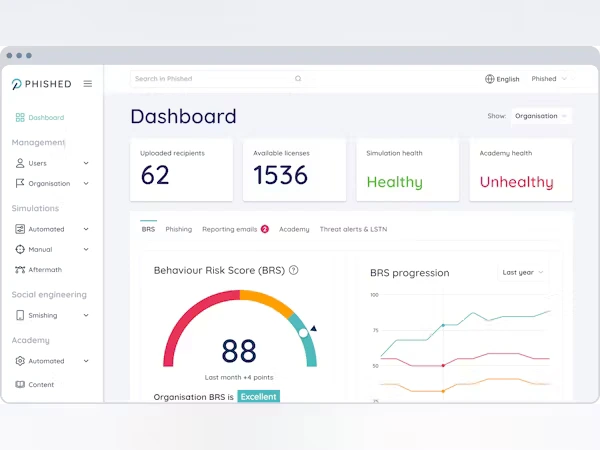
Phished emphasizes AI-driven, personalized phishing simulations and click-triggered microlearning to train users in the moment. The product is optimized for mid-market and MSP use – fast to implement with per-user scheduling – but buyers should validate enterprise references, localization, and multi-vector coverage for larger rollouts.
What users like
AI-driven, personalized phishing simulation
- Similarly to Hoxhunt, reviewers praise Phished’s AI-tailored simulations that adapt to individual behavior, increasing realism and relevance.
- Automated per-user scheduling reduces admin work while keeping simulations unpredictable.
Microlearning moments
- Clicks trigger immediate microlearning (short training modules) so end users receive an on-the-spot lesson – reviewers say this improves retention versus long-form courses (this is also how we train users here at Hoxhunt).
- Reviewers note the platform’s training content is concise and action-oriented.
Easy implementation & clear analytics
- Multiple reviewers call out fast implementation and straightforward admin flows – good for mid-market teams.
- Behavioral risk scoring and exportable analytics and reporting make it easier to show improvement over time.
User satisfaction & reviews
- G2: 4.6/5
- Capterra: 4.5/5
- Software Advice: 4.5/5
Things to consider
Enterprise scale & references
- Phished is growing fast but has fewer long-term, large-enterprise references than other larger vendors (Hoxhunt, by contrast, is often cited for larger US enterprise deployments and Fortune/regulated customers).
Compliance & audit evidence
- If you need explicit audit artifacts for PCI, SOC2, or HIPAA evidence, confirm Phished’s reporting templates and retention policies; some buyers pair Phished with an LMS for compliance reporting.
Localization & language depth
- Phished automates per-user personalization, but buyers flag the need to confirm language/localization quality for all EU/US locales; check sample templates in each language before rolling out globally.
Deliverability & cadence sensitivity (can feel “spammy”)
- Multiple reviewers mention Phished’s frequent, automated sends can feel too frequent if cadence isn’t tuned
Dashboard depth for exec/forensic needs
- Several admins request richer drilldowns for board-level visuals and forensic investigations; you may need to export into BI tools for complex stakeholder reporting.
Phished pros & cons
6. Ninjio
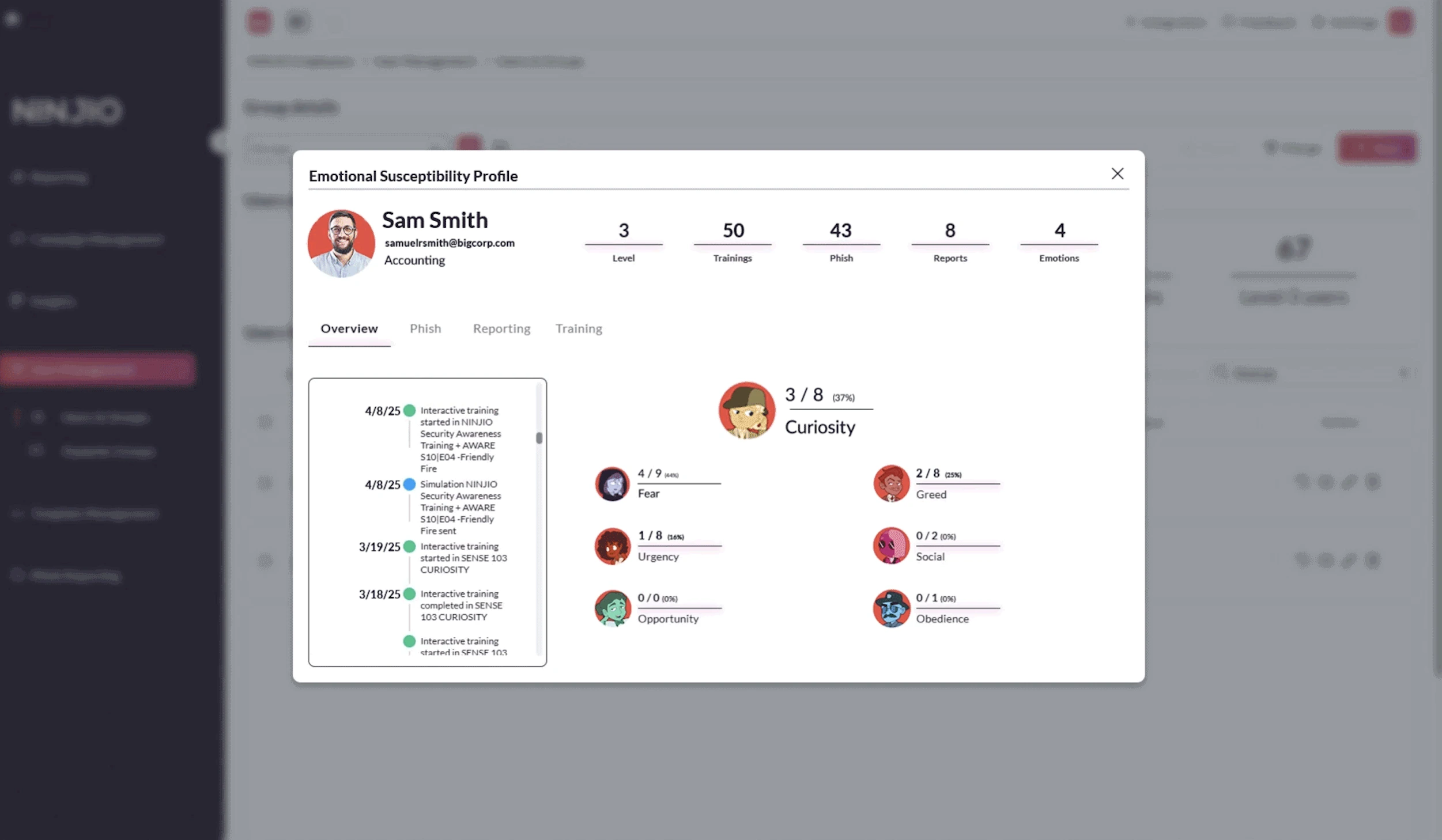
Ninjio delivers short, story-driven microlearning episodes designed to boost attention and recall, with managed delivery options for low-touch rollouts. It’s aimed at engagement-first programs; organizations that need continuous, highly adaptive phishing simulations should confirm simulation depth and cadence options.
What users like
Story-driven microlearning that hooks end users
- Ninjio’s 3–4 minute, Hollywood-style animated episodes are repeatedly praised for being entertaining and memorable.
- Reviewers say the story format increases attention and recall compared with long, generic modules.
Behavioral focus
- The platform builds behavioral profiles and uses those signals to target training and simulated phishing – customers report improved awareness metrics after rollout.
Simple admin experience & managed options
- Many buyers appreciate the facilitated rollout model (client success managers schedule episodes) and the option for a managed phishing-as-a-service delivery model.
User satisfaction & reviews
- G2: 4.9/5
- Capterra: 3.7/5
- TrustRadius: 9.1 /10
Things to consider
Monthly cadence
- Ninjio’s flagship model distributes episodic content on roughly a monthly schedule.
- Reviewers who want higher-frequency microlearning or per-user adaptive cadence sometimes find the cadence too slow.
Phishing simulation depth vs. specialist phishing vendors
- Reviewers praise Ninjio’s storytelling and awareness content, but some admins note the phishing-simulation engine is more tactical than forensic compared with other tools that integrate with SOC or highly adaptive platforms.
Reporting & drilldown requests
- While Ninjio provides behavioral scoring and good adoption metrics, a subset of admins ask for richer executive drilldowns and more granular forensic detail for incident response; large orgs may export to BI tools for board-level visuals.
- Hoxhunt customers often highlight more out-of-the-box board-ready risk visuals.
Variable review scores across marketplaces
Ninjio scores extremely well on G2 (strong engagement/UX signals), but other directories show smaller sample sizes and mixed scores.
Ninjio pros & cons
7. Mimecast Awareness Training
Mimecast combines short, scenario video lessons with practical email-based phishing tests and is frequently chosen by teams already using Mimecast email security. The product favors simplicity and fast mid-market rollouts, but it’s more awareness-focused than a specialist, multi-vector phishing simulation tool.
.webp)
What users like
Short, engaging video-based content
- Reviewers repeatedly praise Mimecast’s short, scenario-driven videos and microlearning approach – they’re described as “fun,” concise, and easy for end users to consume.
Good fit for email-security stacks
- Mimecast’s Awareness Training is often paired with Mimecast email security and is positioned to tie user behavior into broader email-protection workflows.
- Reviewers cite the integration as a plus for programs already using Mimecast email products.
Simple admin & rollouts for mid-market
- Many admins report fast implementation and straightforward campaign scheduling for typical mid-market deployments.
- The product is frequently recommended where ease and short-format learning are priorities.
User satisfaction & reviews
- G2: 3.8/5
- Capterra: N/A (small sample size)
- Software Advice: N/A (small sample size)
- TrustRadius: 8.4/ 0
Things to consider
Mixed review signals & sample size
- G2 shows a mixed set of user scores, with a split between strong “short-video” fans and a few lower-scoring enterprise reviewers.
Phishing simulation depth
- Mimecast focuses on awareness video content and simulated phishing at a practical level, but some buyers seeking highly adaptive, multi-vector phishing simulation (SMS/quishing, deepfake voice, MFA-fatigue) note the platform is more awareness-first than specialist phishing-simulation software.
Support & advanced admin UX
- A number of reviewers call out support response times and occasional admin/UX rough edges (directory integration and campaign scheduling nuances).
- Larger enterprises should pilot the admin workflows to confirm they meet scale and SLA needs.
Mimecast pros & cons
8. Infosec IQ
Infosec IQ provides a large, SCORM-ready catalog and LMS-friendly exports suitable for compliance-centric training programs. The platform automates campaign scheduling and directory sync for scale, though first-time admins may need staged pilots and BI exports to build executive-level visuals.

What users like
Audit-friendly content library
- Training content and SCORM exports make Infosec IQ easy to plug into existing Learning Management Systems.
- Reviewers call out the depth of ready-made training modules and compliance-ready content.
Integrations & automation for scale
- Strong integration with Azure AD / Office 365 and LMS/SOC stacks, plus automated campaign scheduling and phishing simulation workflows that reduce manual admin work.
- Reviewers highlight easy directory sync and automated enrolment.
Risk-focused outcomes (Human Risk Management)
- Customers report sustained reductions in phishing click rates and higher report-rates – delivered as board-ready visuals and a Composite Score that translates campaign results into business risk metrics for executive.
User satisfaction & reviews
- G2: 4.5/5
- SoftwareReviews: 8.2/10
- TrustRadius: 4.8/10
- Capterra: N/A (small sample size)
Things to consider
Reporting complexity for exec visuals
- Some admins say campaign-spanning reports can be fiddly and that advanced board-level visuals often require BI exports or custom dashboards.
Onboarding overhead
- The platform can overwhelm first-time admins.
- Reviewers recommend a staged pilot and vendor onboarding support to avoid configuration missteps.
API & support nuances
- A subset of reviews point to API limitations (some module tiles/data not exposed) and support hours that skew US-centric.
Infosec IQ pros & cons
9. Microsoft Defender (Attack Simulation Training)
Microsoft’s Attack Simulation runs inside Defender for Office 365 and is convenient for tenants on M365 E5, letting teams validate mailflow, conditional access and basic phishing scenarios with low incremental cost. It’s a solid baseline for in-tenant testing but lacks the continuous behavior-change features, gamification, and multi-vector simulation depth found in specialist phishing simulation tool.
.webp)
What users like
Native M365 integration
- Runs inside the Microsoft Defender portal and ties simulation data to Office 365 identities and Defender telemetry.
- Easy to enable for orgs already on Microsoft 365 E5.
No separate vendor lock-in / low incremental cost
- Included with appropriate Microsoft licensing, so teams can run basic phishing tests without buying a separate solution.
Quick, policy-focused simulations
- Useful for validating email filters, tenant configuration, Conditional Access responses, and basic credential-harvest scenarios.
Centralized security tracking
- Results live alongside Defender for Endpoint and other Microsoft security signals, helping Security teams connect simulated phishing to broader threat posture.
User satisfaction & reviews
- G2: 4.5/5
- Capterra: 4.6/5
- Software Advice: 4.6/5
- TrustRadius: 8/10
Things to consider
License dependency
- Attack Simulator requires Microsoft Defender for Office 365 (or E5-level licensing); it’s not a free, standalone enterprise-grade solution for every org.
Feature depth is basic
- It’s designed to validate controls and run basic phishing scenarios; it lacks dedicated behavior-based training, gamification, AI-driven localization, and multi-channel simulations (smishing/quishing/voice/deepfake).
Limited training content & remediation flows
- Microsoft focuses on simulations – you’ll still need a security awareness / microlearning platform if you want continuous learning, adaptive training modules, or teachable-moment landing pages.
Reporting & EEAT for procurement
- Defender’s reports are useful operationally, but many CISOs prefer dedicated board-ready risk dashboards, Composite Scores, and exportable human-risk metrics that specialist vendors (like Hoxhunt) provide out of the box.
Deliverability & configuration caution
- Because it runs in your tenant, test behavior is realistic but still needs mailbox/directory coordination (whitelisting, MTA rules, email filters) to avoid false negatives/positives.
You can see how Hoxhunt compares to Microsoft’s Attack Simulation Training here.
Microsoft Defender pros & cons
Why Hoxhunt is the top pick for enterprises in 2026
Template-driven programs plateau. Security leaders keep reporting the same failure modes at scale: “training plateaus,” “we’re compliant on paper but vulnerable,” and “platforms don’t adapt to skill or role.” Checkbox training has not kept up with how people are actually attacked.
Hoxhunt is built for that gap: adaptive, per-user simulations, gamified engagement that holds up at scale, and reporting that feeds incident response instead of a compliance spreadsheet. The proof is in enterprise programs across the US and Europe, measured in behavior change rather than completion rates:
Qualcomm
United States · 48,000 employees
Enrolled the 1,000 highest-risk employees (of ~50,000): roughly 10× drop in simulated malicious-click rate and a 6× improvement in measurable resilience, then rolled out org-wide. CSO50 Award.
Read the case study →
Uber
United States · ~40,000 users
Training completion rose from 60% to over 90%, simulated threat reporting surged 3×, and a two-person team ran 100,000+ simulations across 500+ scenarios. CSO Award.
Read the case study →
Monster Energy
United States
91% drop in user-driven security incidents (from about 5 a day to fewer than 3 a week) and a 4× lower failure rate (16 to 18% on legacy SAT down to 4%). CSO Award.
Read the case study →
Swisscom
Switzerland (DACH) · telco
Report-phishing button usage reached 85%+ (more than 3× baseline) and phishing simulation failure fell from 15% to below 2%, under strict DACH data-privacy requirements.
Read the case study →
Celonis
Germany · enterprise software
Simulation reporting climbed to over 60% and the failure rate dropped from over 12% to under 4%, with employee-reported signals feeding the incident-response team.
Read the case study →
The pattern repeats at scale: Copart ran 202,992 completed simulations across 963 variants and doubled reporting from 24% to over 50%. Independent buyers rank Hoxhunt the same way. As of July 2026, Hoxhunt holds a 4.8 rating from 3,667 reviews on G2; here is the current enterprise-segment G2 Grid (Summer 2026):
How to pilot before you commit
- Run simulations through your real email client to catch deliverability traps early.
- Test how a reported phish flows into your SOC or SIEM tooling.
- Ask for a managed rollout with cadence tuning, not a self-serve dump.
- Have the vendor turn one internal policy into a short, accurate training lesson.
- Validate translation quality for two priority languages or regions.
Bottom line: for enterprises, the deciding factor is not template volume. It is whether the platform changes behavior and proves it, which is where adaptive, gamified, microlearning-first tools separate from static libraries.
Gamification and microlearning: what actually moves behavior
Two dimensions in the table above decide whether employees engage or tune out. Gamification (points, badges, leaderboards, instant feedback) keeps participation high, and microlearning, a short lesson delivered the moment someone clicks, builds recall that long annual courses lose. The published outcome of running a program on both is measurable: the Hoxhunt Phishing Trends Report 2026 shows adaptive, behavior-first training drives a 9× rise in simulated threat reporting, a 6× improvement in recognizing social engineering within six months, and pushes simulation failure rates from 11% to below 2% while cutting malicious clicks by 87%. Static, library-driven suites tend to be weak on engagement and on-the-spot training, which is why the enterprise results above show up as behavior change rather than completion rates.
Best phishing simulation tools 2026 FAQ
What is the best phishing simulation tool in 2026?
Short answer: There’s no single “best” tool – pick the one that matches your objective.
- If your goal is reducing real risk: favor behavior-first, adaptive platforms that deliver personalized simulations and micro-learning and produce Human Risk Management metrics (many enterprises pick those for measurable outcomes).
- If you need audit/compliance depth: choose vendors with large SCORM/LMS libraries and strong reporting.
- If you want SOC-ready telemetry: pick tools that route reported items into your incident response pipeline and SIEM.
How do phishing simulations work?
Simple flow – designed to teach, not to harm:
- Targeting & design: choose user cohorts and craft realistic templates or mock scenarios.
- Deliverability check: validate that simulated phishing emails pass your email security and URL filtering so results reflect real inbox behavior.
- Launch & measurement: send campaigns, track clicks, reports, and other telemetry (click-throughs, phish reports, time-to-report).
- Immediate remediation: trigger micro-learning modules or short remediation content at the teachable moment.
- Integrate & iterate: feed reports into incident response and threat detection tools, then retest and tune cadence.
How often should we run phishing simulations?
Repetition builds habits. Programs that increase frequency (with adaptive difficulty) see stronger behavior change. Hoxhunt customers report 60% success rates after year one, with the fastest 10% reporting phish in under 60 seconds.
What new phishing attack types should companies prepare for?
Defenders should expect more sophisticated, multi-channel attacks:
- AI-driven, personalized phishing emails (hyper-targeted lures based on public data).
- Deepfake technologies (voice/video spoofing used in CEO fraud / callback scams).
- Smishing / QR code scams (quishing) and social-media lures.
- MFA fatigue & credential-harvest campaigns leading to credential theft or business email compromise attacks.
- Phishing attachments and drive-by payloads that enable endpoint compromise.
Is AI making phishing harder to stop in 2026?
Yes but defenders are using it too.
- Why it’s harder: AI speeds up generation of convincing, personalized lures and can auto-tailor messages that mimic real contacts. That raises realism and increases success rates.
- Why it’s not hopeless: defenders use machine learning for detection, automated URL analysis, and AI-driven simulations that train users on the latest attack patterns (this is what we do here at Hoxhunt)
- What to do: combine layered defenses – anti-phishing tools, URL/web filtering, Microsoft Defender for Endpoint or equivalent, multi-factor authentication, and continuous security awareness training tied to Human Risk Management metrics.
- Practical tip: require vendors to show how their AI improves realism and reduces measurable risk rather than just generating more convincing test emails.
Does Hoxhunt integrate with Microsoft 365 AST?
Yes. Teams commonly evaluate both: AST for Microsoft-native controls; Hoxhunt for behavior change, instant feedback, and enterprise-scale coaching.
How long does a typical enterprise rollout take with Hoxhunt?
With SSO/SCIM ready, you can launch quickly to a baseline cohort and begin onboarding immediately. Individual users complete onboarding in about a minute, and the first 8 weeks post-launch are the key engagement window with planned comms/activations in weeks 1–2, 4, and 7–8. Exact calendar time to full enterprise coverage varies by change-management and comms cadence.
How much do phishing simulation tools cost?
Most enterprise phishing simulation platforms are quote-based, priced per employee per year, with the rate falling as seat count rises. Content depth, AI personalization, integrations and support tier move the price more than the sticker rate. Evaluate cost against outcome per seat: measurable risk reduction, reporting rate and analyst hours saved, not the headline number. Run a 60 to 90 day pilot before committing to a multi-year contract.
Sources
Security Awareness Computer-Based Training – Gartner Peer Insights, 2025
Attack simulation training (Microsoft Defender for Office 365) – Microsoft Learn, 2025
Peer review platforms (G2; TrustRadius; Capterra; SoftwareReviews) – G2 / TrustRadius / Capterra / SoftwareReviews, 2025
Verizon Data Breach Investigations Report (DBIR) – Verizon Business, 2025
Hoxhunt – product reviews (G2), 2025
Hoxhunt – verified reviews (Capterra), accessed Sep 2, 2025
KnowBe4 – product reviews & resources (G2), 2025
Proofpoint – product/review listing (Gartner product page), 2025
Cofense PhishMe – product reviews (G2), 2025
Phished – product reviews (G2), 2025
Infosec IQ (Infosec Institute) -product reviews (G2), 2025